
Securing your brand is only half the battle. Once the Trademark Registry grants your trademark, you need the official documentation to enforce your rights. The trademark certificate download process through India’s IP India portal is a simple, paperless procedure — yet many applicants remain unaware of exactly where to go, what details they need, and when the certificate becomes available.
This tutorial walks you through every step of the trademark certificate download process, step by step and gives you the insider knowledge to retrieve your certificate without confusion or delay.
What Is a Trademark Registration Certificate?
A trademark registration certificate is the official document issued by the Controller General of Patents, Designs & Trade Marks (CGPDTM) confirming that your trademark has been registered under the Trade Marks Act, 1999. It serves as conclusive proof of ownership, the date of registration, the goods or services covered under the mark, and the validity period of the trademark.
Having this certificate is critical when you want to use the ® symbol, initiate legal proceedings against infringers, license your mark, or present your trademark rights to business partners or investors.
Where Can I Download My Trademark Registration Certificate?
The official and only authorised portal for trademark certificate download in India is the IP India website managed by the Office of the Controller General of Patents, Designs & Trade Marks. You can access it at:
https://ipindia.gov.in
From the homepage, you must navigate to the Trademark section and access the e-Register or the Trademark Application portal. You will not find the certificate on any third-party website, so always rely on the official IP India portal to ensure authenticity.
When Is the Trademark Certificate Download Available After Registration?
One of the most common questions applicants have is about timing. The trademark certificate download typically becomes available within a few days after the registration order is passed by the Trademark Registry. Here is a general timeline:
- After the trademark is advertised in the Trademark Journal and the opposition period (4 months) passes without any opposition, the Registrar proceeds to register the mark.
- Once the registration order is issued, the certificate is usually made available on the portal within 2–7 working days.
- For fast-track or expedited applications, the timeframe may be shorter, provided all formalities are complete.
Keep monitoring the IP India portal regularly once your application status changes to “Registered.” You do not need to wait for a physical copy — the digital certificate downloadable from the portal is legally valid.
What Details Are Required for Trademark Certificate Download?
Before you begin the trademark certificate download process, make sure you have the following information readily available:
- Trademark Application Number: This is the unique number assigned to your trademark at the time of filing. It is printed on your filing receipt.
- Registered Email ID or Phone number.
Having your application number is mandatory for accessing the certificate, so note it down at the time of filing.
Can I Do Trademark Certificate Download Using Application Number?
Yes, the application number is the primary identifier used throughout the trademark certificate download process.
Even without logging in, you can verify whether your trademark has been registered by entering the application number in the public Trademark Status search on the IP India portal.
How to Login for Trademark Certificate Download
Follow these steps to log in to the IP India portal and initiate your trademark certificate download:
- Visit the official IP India portal at https://ipindia.gov.in
2. On the homepage, click on “Trade Marks” from the main navigation menu
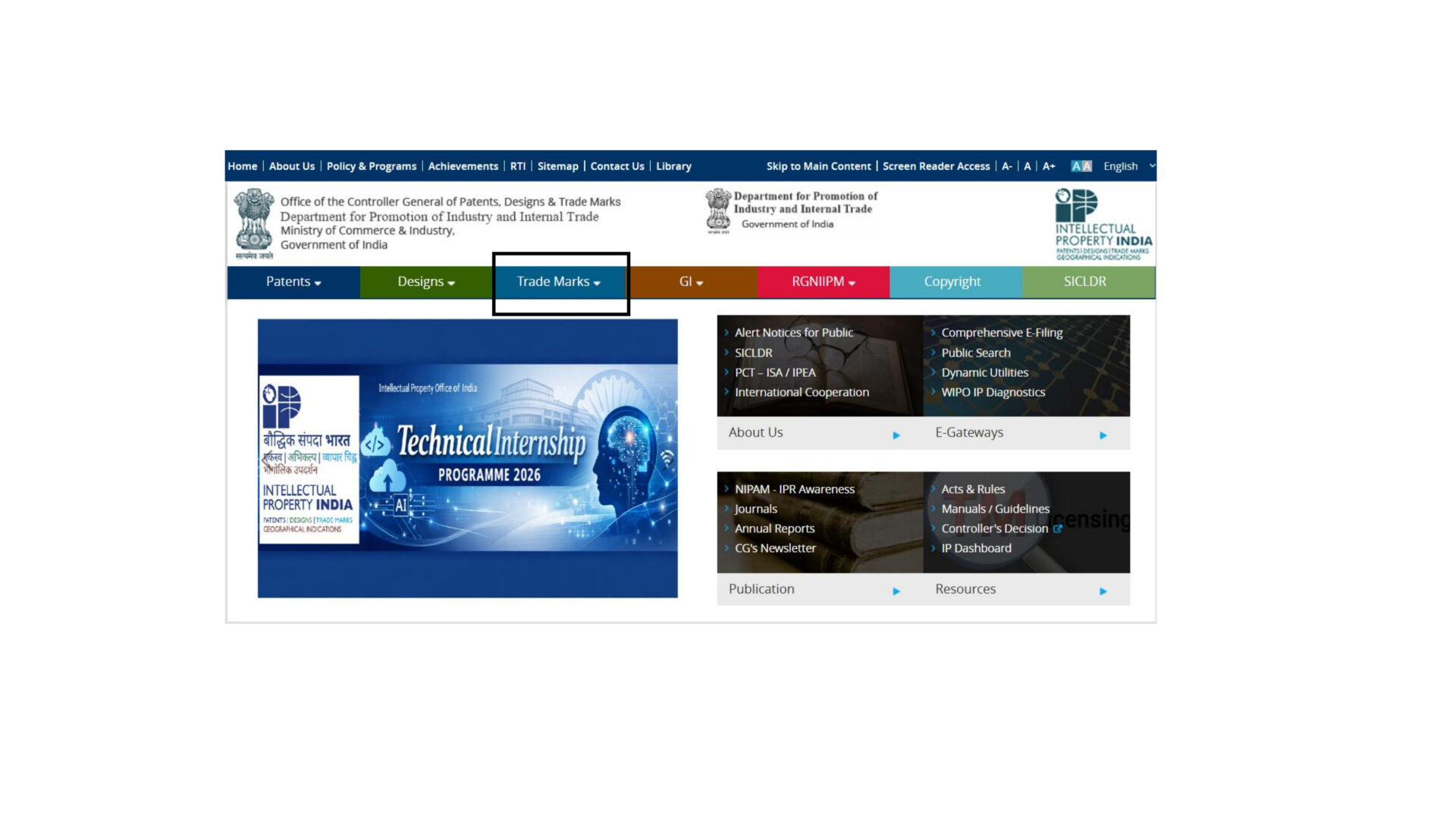
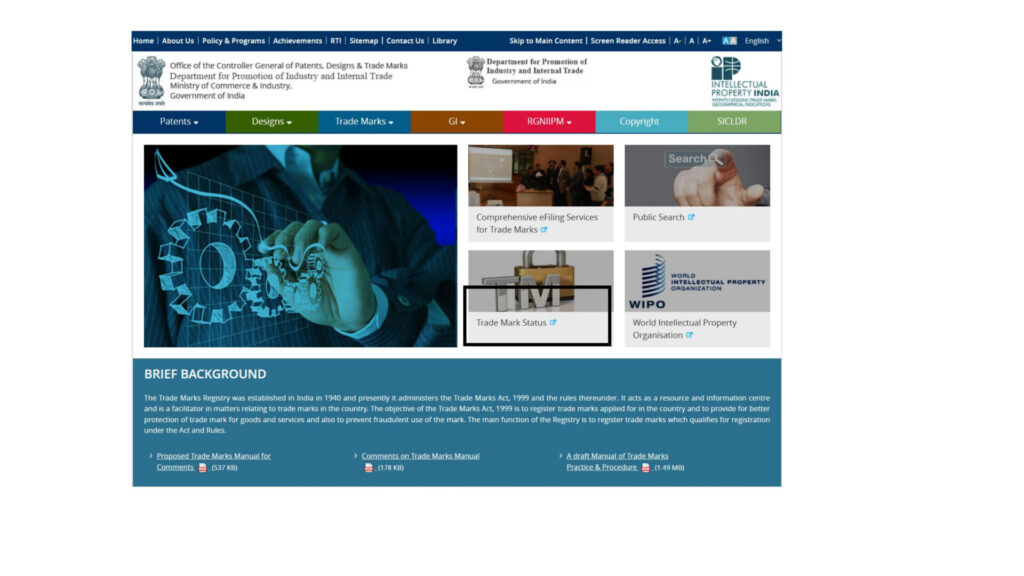
3. You will be directed to the Trade Marks Registry page. Look for “Trademark Status” in the menu.
4. Enter your Email ID or Mobile Number to receive an OTP for verification.
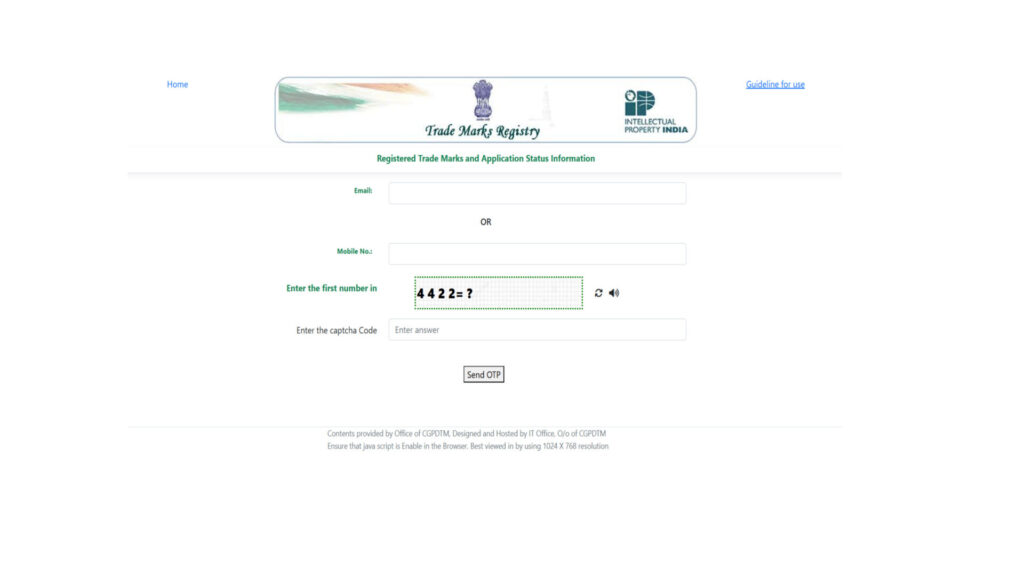
5. Enter the Captcha code displayed on the screen to proceed.
6. From the search type dropdown, choose “Trademark Application / Registered Mark”.
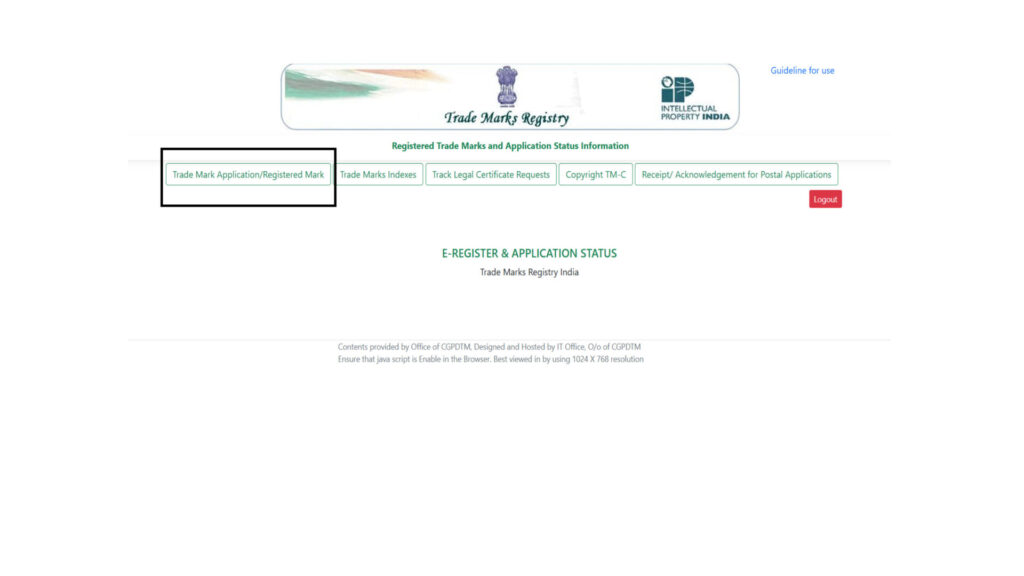
7. Select “National / IRDI Number” as the search criteria.
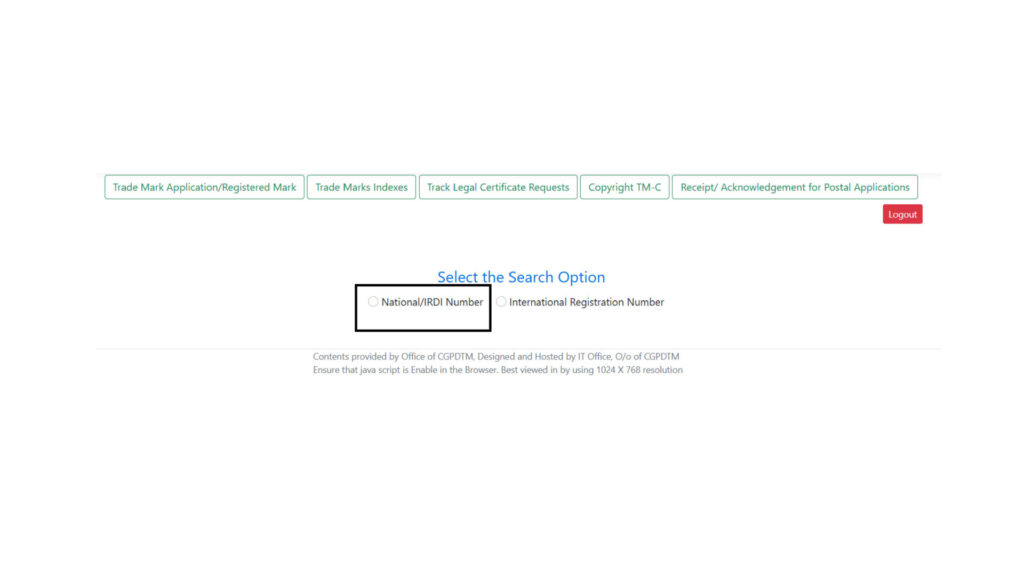
8. Enter your trademark application number in the search field, fill in the Captcha, and click Search.
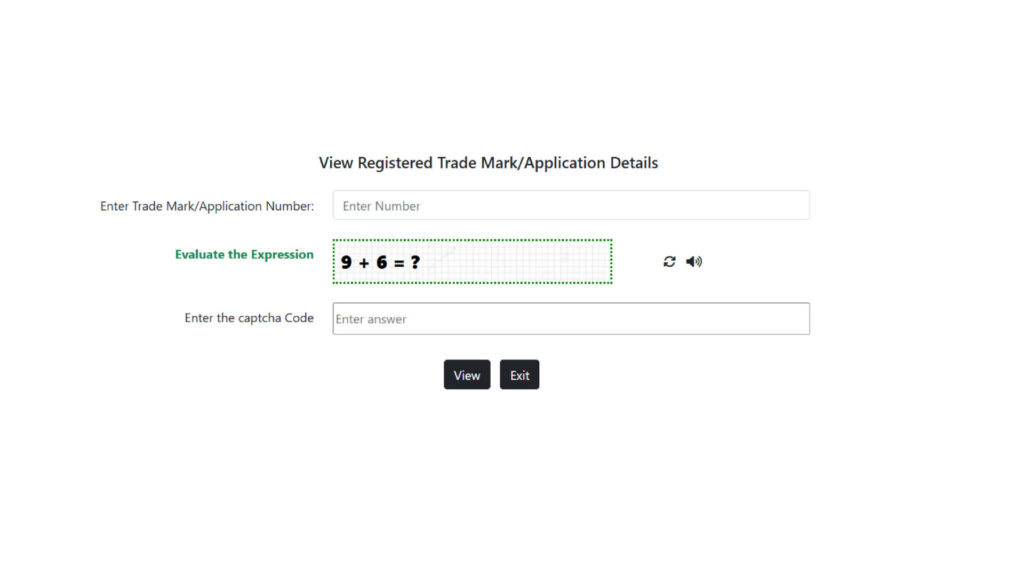
9. Your trademark will appear in the results table. Click on the trademark number and navigate to the “View Registration Certificate” section to download your certificate directly.

10. Alternatively, you can navigate to the “Upload Document” section within the portal, where your trademark certificate is also available for download.
Why Professional Help Makes the Trademark Process Easier
The trademark certificate download is the final, rewarding step in what can be a lengthy and complex registration journey. From conducting a thorough trademark search, filing the application correctly, responding to examination reports, and managing oppositions, there are multiple points where errors can delay your trademark. A professional trademark registration company can make all the difference.
What to Do After Trademark Certificate Download
Completing your trademark certificate download is a milestone — but it is not the end of the road. Here is what you should do after securing your certificate:
- Use the ® Symbol: Once registered, you are legally entitled to use the ® symbol next to your trademark. This serves as a public notice of your rights.
- Monitor for Infringement: Regularly watch the market and the Trademark Journal for applications that may conflict with your mark.
- Renew on Time: Trademark registration in India is valid for 10 years from the date of filing. Set a reminder to renew before expiry to maintain your rights.
Conclusion
The trademark certificate download from the IP India portal is a straightforward process once you know the right steps. With your application number, and a registered status on the portal, you can retrieve your certificate in minutes. This digital certificate carries the same legal weight as a physical one and is your ultimate proof of trademark ownership in India.
Whether you are a first-time applicant or managing a growing brand portfolio, keeping your trademark documents organised and your registration current is non-negotiable. Start the process right, monitor it diligently, and do not hesitate to seek professional assistance when needed.
For end-to-end trademark support — from filing to certificate download — visit Intellect Bastion and let our IP experts handle the complexity while you focus on building your brand.